
An ACU (Agent Compute Unit) measures work that Flux performs in a project. Flux uses ACUs for electronics, mechanical design, firmware, simulation, and manufacturing.
How ACUs work
The ACU amount for a request depends on the task and project. To check usage for one thread, open the thread's More menu. Read Your usage for this chat thread.

Flux uses ACUs from the project owner's account:
If an organization owns the project and you are a member of that organization, Flux uses the organization's ACUs.
For other projects, Flux uses your ACUs.
Included ACUs
Paid Flux plans include monthly ACUs:
Explore: 40 ACUs.
Build: 120 ACUs.
Pro: 400 ACUs.
Teams: 600 pooled ACUs, plus 60 ACUs for each additional seat.
Included ACUs renew each month.
Paid ACUs
On Build and Pro, each paid ACU costs $2. A monthly spending limit controls paid ACU use.
Manage individual ACUs
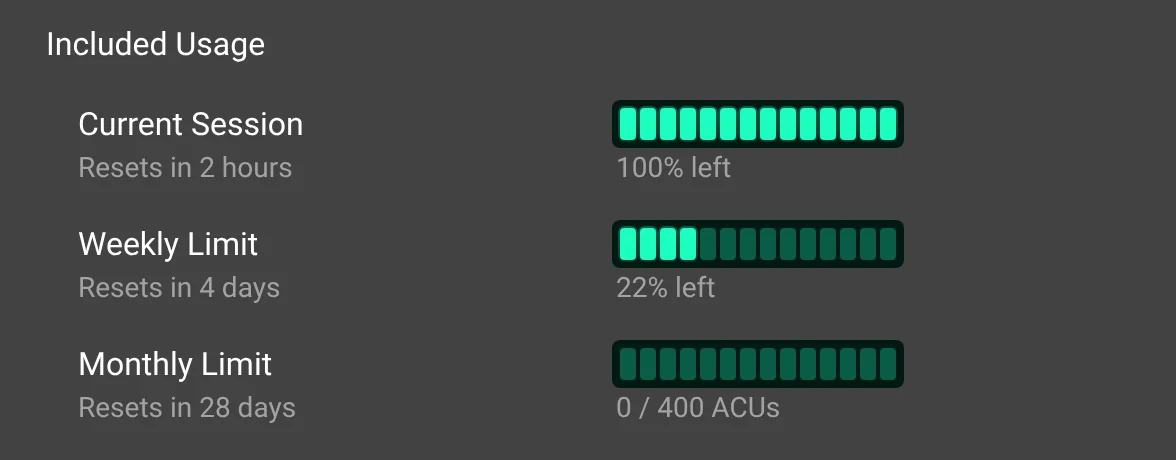
Open Account menu → AI Usage to review your personal usage. The AI Usage gauge appears above Settings in the account menu. Hover over it to see the available amount. Select it to open Settings → Plans and Usage at AI Usage. The Available Right Now row shows the same gauge and available amount. Included Usage groups the Current Session, Weekly Limit, and Monthly Limit bars. See How on-demand usage and usage limits work for details.
On a Build or Pro plan, use the ACU panel in Chat to set a monthly limit for paid ACU use:
Select Enable On-demand Usage.
Choose a monthly limit.
Select Set Limit.
To change an existing limit, select Raise On-demand Limit, choose the new limit, and select Set Limit. Flux bills paid ACUs as you use them.

Manage organization ACUs
Open the organization profile to review its ACU balance. For a project owned by the organization, use the ACU panel in Chat to set or raise the organization's monthly limit:
Select Enable On-demand Usage.
Choose a monthly limit.
Select Set Limit.
Select Raise On-demand Limit to increase an existing limit.
Organization ACUs apply to requests in projects owned by that organization. Your personal ACUs apply to projects owned by your personal account.
FAQ
Are ACUs used when a response is not useful?
Yes. ACUs measure the work Flux performs for a request.
Where can I review ACUs used in a thread?
Open the thread's More menu. The menu shows Your usage for this chat thread and the ACU amount.
Which account pays for a request?
The project owner's account pays. Organization-owned projects use the organization's ACUs when you are a member of that organization. Other projects use your personal ACUs.
How do I use paid ACUs?
On a Build or Pro plan, select Enable On-demand Usage in the ACU panel in Chat. Choose a monthly limit and select Set Limit. Paid ACUs cost $2 each.
How does Flux bill paid ACUs?
Flux bills paid ACUs as you use them, up to the monthly spending limit.