
Access and collaboration
PCB Editor
Files Import/Export
Title
Message
Create new category
What is the title of your new category?
Edit page index title
What is the title of the page index?
Edit category
What is the new title of your category?
Edit link
What is the new title and URL of your link?
Object-Specific Layout Rules
AI Tools
Copy Markdown
Open in ChatGPT
Open in Claude
Connect to Cursor
Connect to VS Code
As the name suggests, object-specific PCB rules apply only to the selected object. Only Selector-Based Layout Rules can be applied to multiple objects.
Quick Method: Using the Toolbar (Recommended)
For individual objects, the fastest way to modify layout properties is to use the toolbar, which appears automatically when you select an object in the PCB editor.
Traditional Method: Using the Inspector Panel
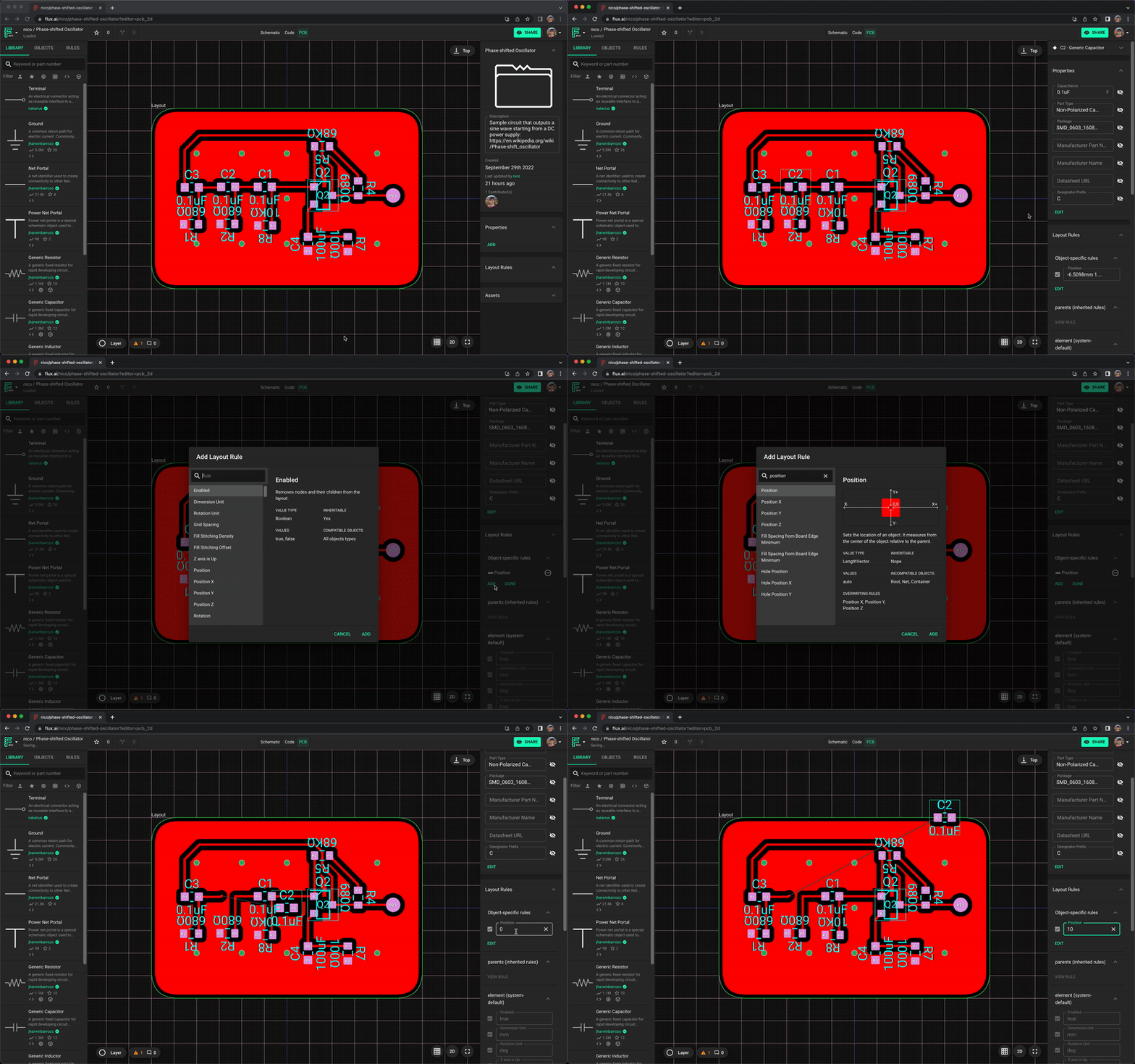
To add an object-specific rule through the inspector panel:
- Select an object
- Find the "Layout rules" in the right-side menu
- Click on "Edit" -> "Add"
- Search for the desired rule and add it.
Type to search, ESC to discard
Last updated on
Was this page helpful?
Next to read:
Selector-Based Layout Rulesnull
Discard Changes
Do you want to discard your current changes and overwrite with the template?
Archive Synced Block
Message
Create new Template
What is this template's title?
Delete Template
Message