
Bring your existing part library to Flux in one step, with the electrical parts and the mechanical parts together.
Import a whole library
Tell Flux which library to import and which details to keep. Flux finds the parts and shows their symbols, footprints, and 3D models so you can choose which parts to add.
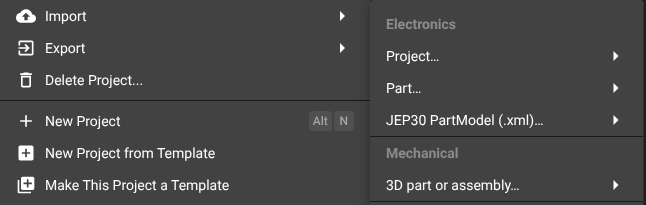
In the editor, select Flux menu → Import → Part…. Choose a ZIP archive, a folder, or individual files. Review the parts Flux finds, select some or all of them, then import them.
Flux can read MPN and supplier lists from a spreadsheet. Give Flux the spreadsheet and ask it to find the listed parts. Imports add new parts; they do not change an existing part. Imports go to your user library or the organization that owns the current project. See How the library works.
How Flux avoids duplicates
Ask Flux to compare the library parts with the parts you want to import. Flux searches your library by part name and MPN and links a matching part that it finds.
Review the matches in the part import dialog. Importing a part creates a new part and does not change an existing part.
Make library parts from a design file
Ask Flux to import the part data from a design file. Flux creates one library part for each part in the schematic. A board-only file creates parts from its footprints.
Select Flux menu → Import → Project… and choose the design files. Review the parts Flux finds, then import the selected parts. A project import can also create a Flux project with its schematic and board. See the Altium, Eagle, Fusion, KiCad, NX, Onshape, and SOLIDWORKS migration guides.
Import mechanical CAD parts
Ask Flux to import a STEP model or a mechanical CAD file as a part. Flux creates a part with its model, which you can edit in Flux.
Select Flux menu → Import → 3D part or assembly… in the Mechanical section. Choose STEP or STP, SOLIDWORKS, Parasolid or NX, or Fusion 3D files. See Import and edit CAD files and Mechanical parts.
Supported file formats
Tell Flux which library or design file to import. Flux reads the supported formats and creates parts from the source data.
Choose Flux menu → Import → Part… for libraries, Project… for design files, JEP30 PartModel (.xml)… for JEP30 files, or 3D part or assembly… for mechanical CAD. The formats are:
Format | File extensions |
|---|---|
EasyEDA / LCSC |
|
DipTrace library |
|
KiCad library |
|
Fusion electronics library |
|
Eagle library |
|
Allegro footprint |
|
Altium library |
|
OrCAD library |
|
PADS library |
|
| |
Parasolid / NX |
|
Fusion 3D |
|
SOLIDWORKS |
|
KiCad project |
|
Altium project |
|
EDIF project |
|
CADSTAR project |
|
Eagle project |
|
Fusion electronics project |
|
DipTrace project |
|
Proteus project |
|
IPC-2581 project |
|
ODB++ project |
|